

Drupal is an open source content management system (CMS) widely used by Australian government websites. For example, GovCMS is a customised version of Drupal. Peakhour now provides a purge module for Drupal 8/9, extending our existing Drupal support.
The Peakhour Purge module extends the Drupal Purge module. The Purge module provides a standardised way of integrating third party CDNs, like Peakhour, with Drupal's native full page caching support. Drupal's native support is suitable for small websites, but has a number of drawbacks. These drawbacks include:
- Doesn't support the Vary header.
- Is served by PHP, so it doesn't scale well.
- Runs on the same server as Drupal, so geographic latency is still an issue.
Peakhour's edge cache and delivery layer removes these issues before requests reach origin, and also adds image/content optimisation and website security.
Default Caching
Since version 8, Drupal has supported cache tags to provide efficient, targeted invalidation of content for anonymous browser sessions. In this context, anonymous means a user that does not have a Drupal Session cookie. Peakhour supports cache tags for all sites, a feature some competitors reserve for 'Enterprise' plans.
Cache tags are great, but another default setting is not. That setting is to add a:
Vary: Cookie
Header to the page response to make sure that logged-in users don't get cached pages. The Vary header informs a cache that different content may be served from origin based on the value in the Cookie header sent by the browser.
This is fine if you are using Drupal with no third party javascript libraries. If you do use third party libraries, it can render page caching close to useless. For example, drupal.org itself uses perimeterx for bot detection, which results in a unique session cookie being set on the very first request.
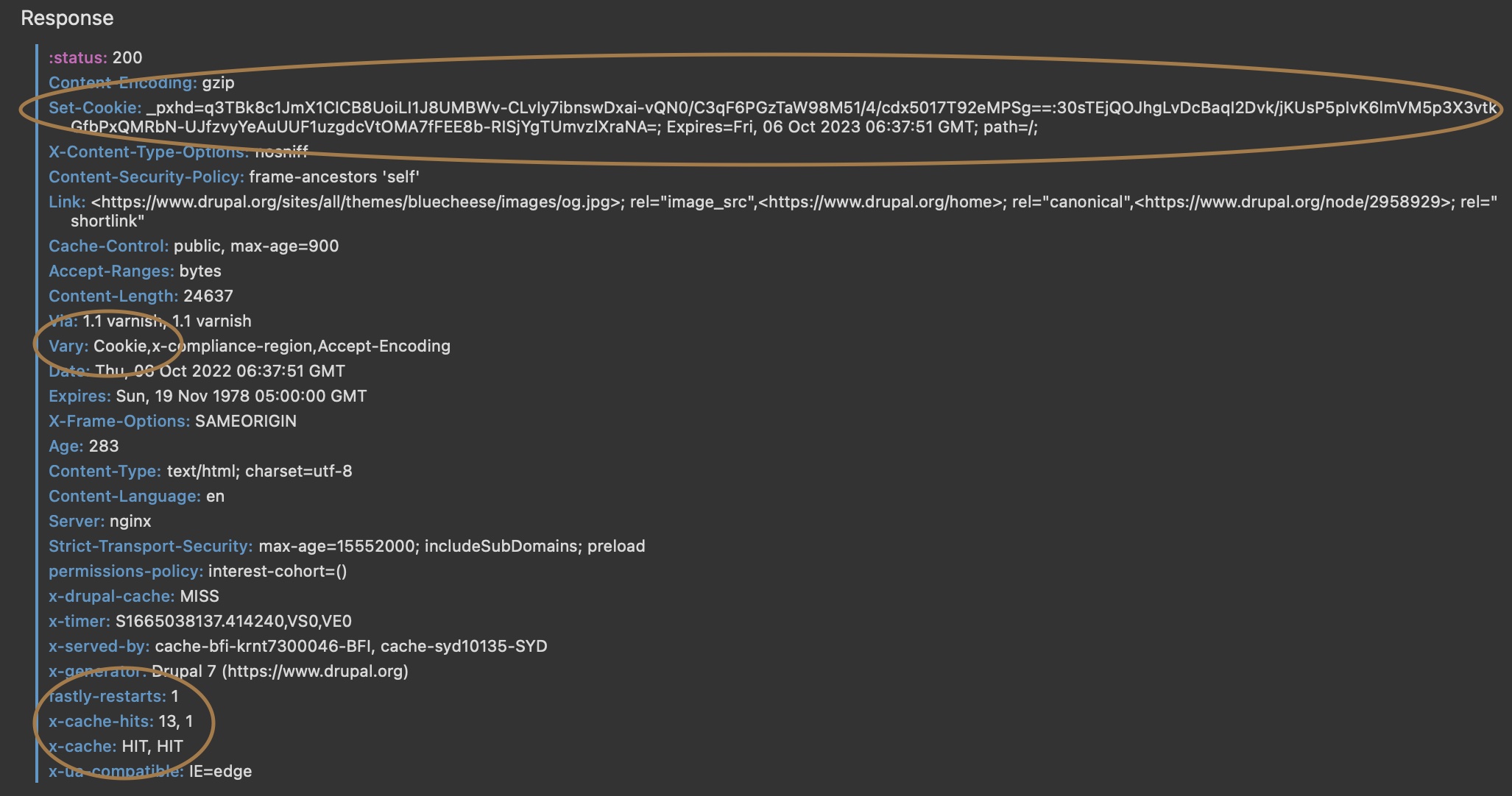 The first request to drupal.org results in a unique cookie being set by perimiterx
If you use Google analytics, Facebook, or any of a wide array of popular third party libraries, the same thing can happen.
This means only the very first request from the user could be served from a general page cache. Hit rates would be virtually zero.
Fix the Vary issue with Skip Cache on Cookie
Peakhour gives you a way to work around this. The first step is to disable the Vary: Cookie header. Then, to make sure any user with a Drupal Session bypasses the cache, use Peakhour's Skip Cache on Cookie feature. As soon as Drupal sets a session cookie, eg when someone logs in, Peakhour will pass requests through to the origin. Full instructions on how to do this are provided on our drupal module documentation
eCommerce Drupal sites
If you are running an ecommerce store, or some other type of site that might serve customised information on a page, for example a mini cart with cart count/information, then you will have to do custom development to continue caching pages. A workaround for a mini cart would be to make it load via Ajax or to use local browser storage, and Peakhour assists in making that happen.
Future features
Hopefully in the future Drupal will support setting its own cookie for varying the cache, in a similar manner to Magento 2. eg X-Drupal-Vary, this would allow Peakhour to store multiple versions of a page to serve to different users. For example, a user in Germany might get a version of a page in German with German currency.