
Adobe Commerce merchants do not usually notice Fastly overages straight away.
Traffic looks normal. Revenue looks normal. The site feels fine. Then the bill lands and CDN usage is well above contract.
In our experience, the drivers of CDN overages are due to Adobe Commerce and Fastly default behaviour.
The biggest culprits are:
- shielding
- ESI forcing uncompressed HTML from origin
- PNG-heavy catalogues and storefront assets
- bot traffic pouring fuel on all of the above
We recently worked with Dymocks and helped them reduce their CDN usage from 55 TB of monthly traffic down to 6 TB after we fixed the waste in the delivery path and filtered unwanted traffic, case study coming soon.
1. Shielding helps performance, but it can hurt your bill
Fastly shielding exists for a good reason. It reduces origin load and can improve cache efficiency by funnelling misses through a shield POP before they go back to origin.
The catch is billing.
Fastly is clear that traffic from one POP to another counts towards both request count and billable bandwidth. In the most extreme case, if everything is effectively a pass, request count and delivery bandwidth can almost double because the request is handled by two Fastly POPs instead of one.
That means a cache miss is no longer a simple edge-to-origin event. It becomes:
edge → shield → origin → shield → edge
If your cache hit rate is strong, that trade-off may still be worth it. If page caching is weak, purges are frequent, or large parts of the site are missing cache, shielding turns into a billing multiplier.
2. ESI (Edge Side Includes)
ESI is an old technology that allows a proxy (like Fastly) to 'assemble' pages using content fetched from another source.
Adobe Commerce/Magento 2 will use ESI out of the box for its navigation bar. The reasoning is to allow the navigation to be purged from the CDN independent of the page content. In theory this makes Full Page Caching more effective. In practise the difference is negligible as the Full Page Cache is cleared daily anyway.
Fastly’s ESI documentation says ESI cannot be
performed on content compressed at origin. Fastly needs to inspect the response body for <esi:...> tags, and
compressed content hides those tags from the parser.
The default Fastly configuration for Adobe Commerce will strip the client Accept-Encoding header
before the request goes to origin.
The origin then returns uncompressed HTML, Fastly scans it for ESI, and only later is the response compressed again at the EDGE before it is delivered to the browser.
From the shopper’s point of view, nothing looks wrong. The page still arrives compressed at the edge. Performance may still look fine.
From a billing point of view, it is a very different story.
Magento’s default layout gives the top navigation block a ttl="3600" in default.xml, which makes it an ESI candidate out of the box. The Fastly Magento VCL snippets also show the downstream effect: Fastly sets x-compress-hint because “varnish doesn't compress ESIs”, so compression is pushed later in the chain.
Now combine that with shielding.
Say your page is:
- 50 KB compressed
- 600 KB uncompressed
If the request misses cache and shielding is enabled, you are not paying for a tidy 50 KB response. You are moving the 600 KB object through the shield path, and that larger object is counted across both the shield and edge legs.
That is effectively a 600 KB × 2 event.
That is why broken page caching hurts twice:
- you get more misses
- each miss is much larger than most teams realise
If enough HTML is missing cache, overages rise very fast.
3. A simple way to spot the problem in New Relic
An easy way to check for ESI driven egress is to open New Relic and look at CDN usage by content type.
If text/html is driving more usage than images, that is a strong sign you are paying for uncompressed page responses on cache misses.
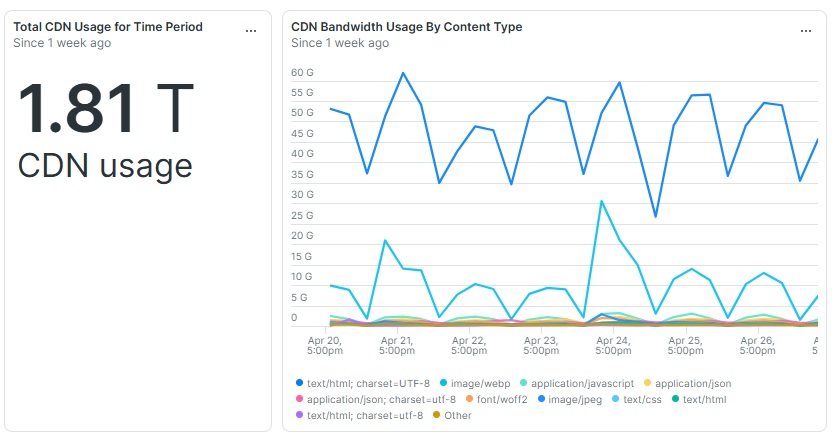 text/html content type being the top CDN usage content type is a red flag.
That pattern usually points back to the same combination:
- ESI
- shielding
- weak cache hit rates
On a healthy eCommerce site, images are usually the major share of bandwidth. When HTML starts dominating, something is off.
4. PNGs are another quiet cost driver
Fastly can absolutely turn a PNG into WebP, but that does not automatically mean you get a small lossy image.
Fastly’s own Image Optimizer reference says that if the source image is a lossless format, the output defaults to lossless
when the chosen output format supports it. Fastly is explicit about the PNG case: with a PNG source and
format=webp, format=jxl, or format=auto, the output image is lossless by default. In other words, Fastly can
transform a PNG into a lossless WebP unless you explicitly force a lossy path.
That is why PNG-heavy catalogues can still burn a lot of bandwidth even when teams think Fastly is “optimising” them. The image format may change, but the delivery path can still stay lossless, which means the file is often much larger than expected. Fastly also notes that lossless output preserves all image data and therefore produces larger file sizes, basically the same as the source image.
This is where many Adobe Commerce stores get caught out. Most merchants rely on the default Fastly image setup and do not add per-image parameters or rewrites. Fastly’s documentation says that most image transformations require query string parameters on individual requests, and its default behaviour notes that WebP quality is 85 for lossy WebP images, not that every PNG source is automatically pushed into lossy Webp.
If you want smaller files, you need to force the outcome. Fastly says you can do that by using format=auto with
quality<100, or by explicitly using a lossy WebP path. Adobe Commerce’s Fastly image optimisation settings also
expose a Force lossy conversion option for this reason.
What to do about it
You do not need a full replatform to reduce overages. Most of the wins come from cleaning up the delivery path.
Review shielding
Start by measuring shielding, not assuming it is free.
Disabling shielding can be a fast way to cut billable traffic. The trade-off is lower cache efficiency and more origin load, so this needs testing, not guesswork.
Remove ESI where it is not earning its keep
On many Adobe Commerce builds, ESI is there mainly so the navigation block can be flushed independently.
That is rarely a good reason to pay for inflated HTML misses.
The usual fix is:
- change the Magento layout or template so the block no longer needs ESI
- strip the
X-ESIpath in VCL - restore
Accept-Encodingto origin requests so HTML can travel compressed again
This is often the biggest bandwidth win because it reduces the size of every miss, not just edge delivery.
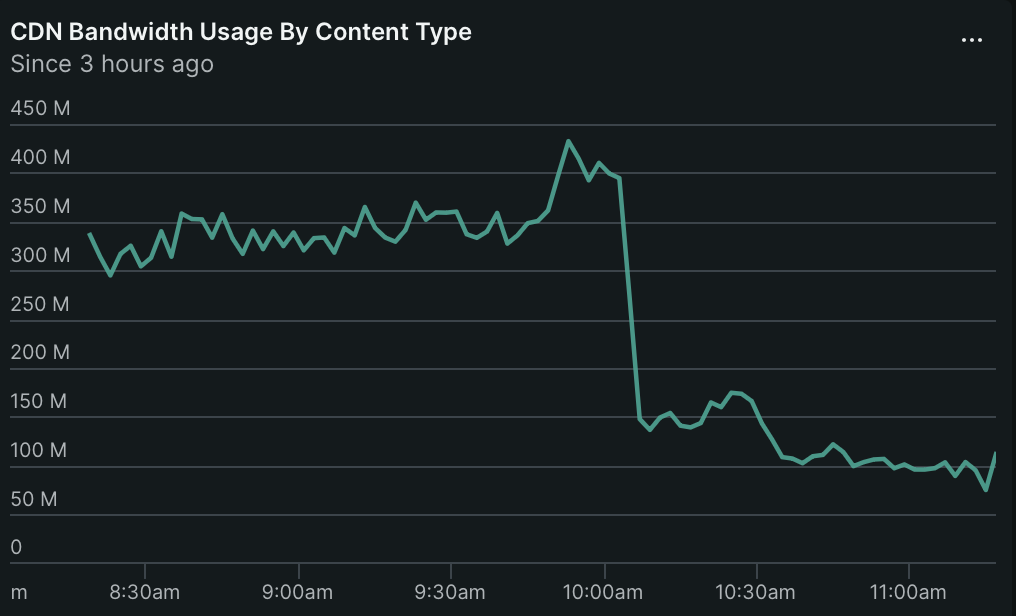 The immediate effect of disabling ESI and enabling compression from origin.
Force lossy png conversions
Fortunately forcing lossy conversion of PNG images is relatively straightforward.
Use VCL to rewrite image urls to include a query string, eg
/someimage.png
becomes
/someimage.png?format=auto&quality=85
Expect a 400kb source image to go to 100kb for no discernable difference. Play with quality for bigger gains.
Do not ignore bots
Then there is the traffic you never wanted in the first place.
Bad bots amplify every weakness above. They hit uncached pages, search pages, category pages, and dynamic endpoints. That creates more misses, more uncompressed HTML fetches, more shield traffic, and more wasted bandwidth.
This is why CDN cost control is not just a caching conversation. It is also a traffic quality conversation.
If you can stop junk traffic before it burns CDN bandwidth, the savings stack on top of the caching fixes.
That is where Peakhour fits. We help stores cut unwanted bot traffic before it turns into Fastly overages, and the upside can be dramatic. For example, we've helped one store go from 55 TB per month down to 6 TB.
Final thought
If your Fastly bill feels out of proportion to real shopper demand, start with two questions:
Why are we missing cache so often?
Why is text/html using so much bandwidth?
If those numbers look wrong, the overage usually stops being mysterious.